LINEFOLLOWER
The competition task
To build a autonomous mobile robot, which will travel the whole defined path in a certain time. The direction and course is defined by the dark line.
The path
The background of the path will be white with dark (black) navigation line on it (width 15 +/- 1 mm). Total length of the path won’t be more than 10 meters. Material used will be a chipboard.
The smallest radius of curves used in the path will be 30 cm Total rising of the path won’t exceed 2 cm; maximal rising or declining is 5%.
The robot’s task is not to find the right way, just to follow the navigation line.
The robot starts within the starting area, which is 30 cm before the start line (infrared beam of the time measuring device). When the beam is interrupted by any part of the robot, the time starts to be measured.
The time measurement is stopped when the similar beam of light located at the end of the path is interrupted.
There are no barriers at the edge of the contest area. On the each side of the dark line will be the 15 cm wide safety area. Organizers can not guarantee that area around the arena will be open. Hence the authors used to carefully evaluate the sensor measurements, especially near the arena edges.
Palying areas
Based on the dimensions of the NITRObot, when you design your own line following tracks, you should follow a simple rule – the minimum radius of the curve should be 300 mm (30 cm).
Here are two reference designs- one closed loop and the other with start and finish lines:
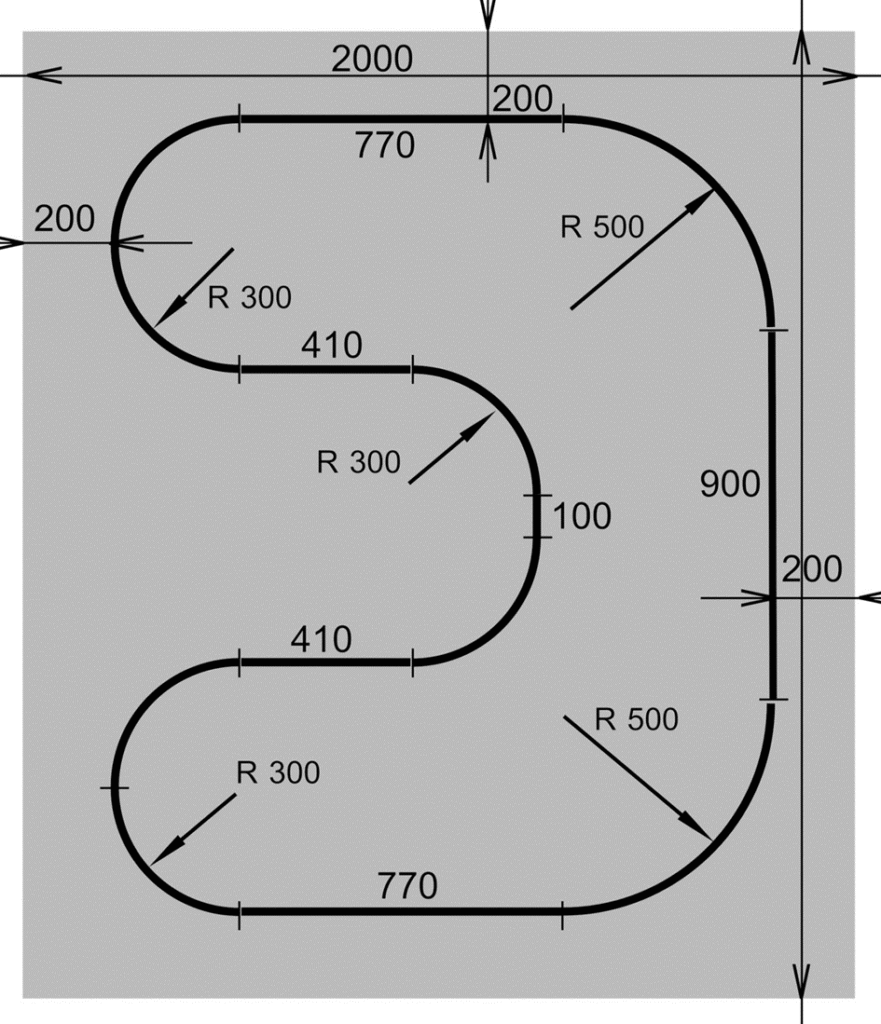
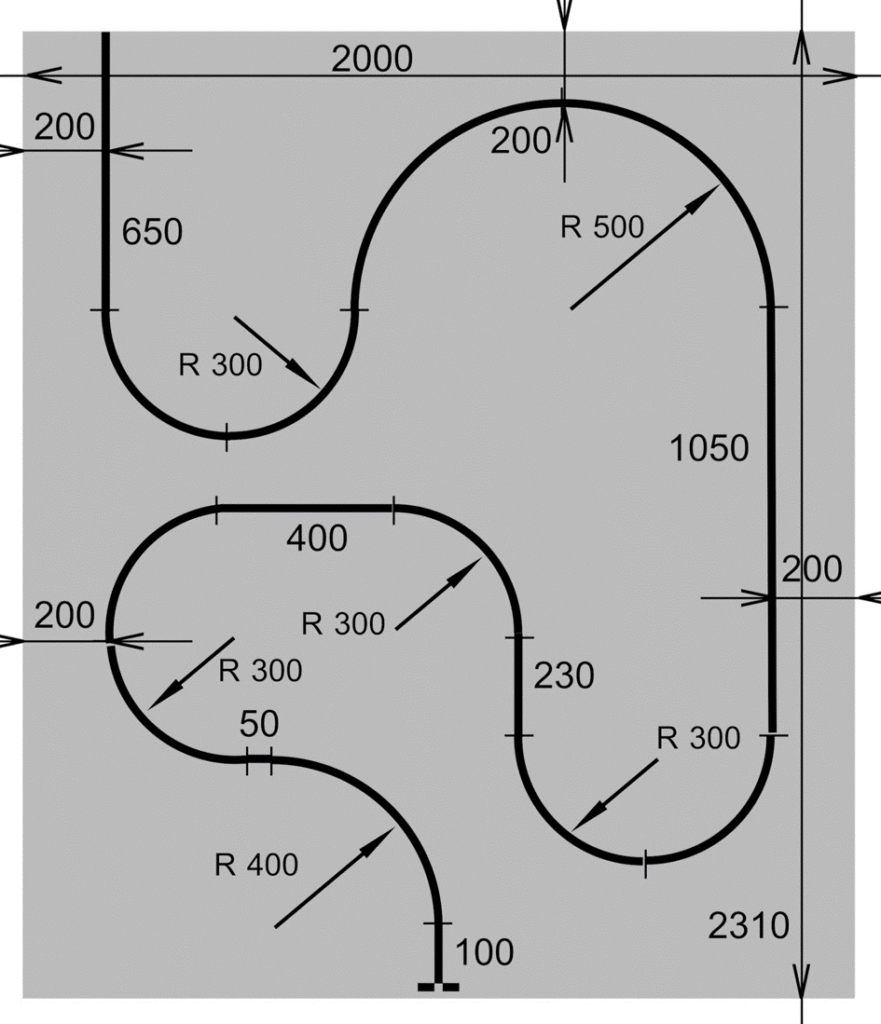
Robot operation
There must not be any interference between the robot and its team after the robot is set in the starting circle and turned on. The robot must be controlled only by its electronics.
The robot may not leave the line after crossing the starting line. Avoiding obstacles is the only one exception. While moving, the robot may not leave any marks or beacons on the table. No parts can remain on the path during the run.
The competitor is disqualified when the competition path is damaged.

The competition and the order of the competitors
The competitors must be prepared to the start within 1 minute after the call. Every robot has total 3 runs to compete. But if the competitor does not present within 1 minute after the call, the run is lost. The time between the runs can be used for fixing and adjusting the robot. In the case of too many competitors, the jury can decrease the number of runs, or it can proclaim a qualifying round.
Time limits
The robot has 8 minutes to complete the path. After 8 minutes, the time measurement is stopped and the run is canceled. But the robot is not disqualified. The time stop has no affect on the next runs.
Evaluation and prices
The winner is the robot with the shortest time from any of the three runs. Unfinished run will not be evaluated.
The jury can also award the robot with the best design or interesting construction.
And, of course, all the general rules apply.
Security
The three laws of robotics:
- A robot must not harm a human or, by its inaction, allow a human to be harmed.
- A robot must obey a human command, except when such a command conflicts with the first law.
- A robot must protect itself from destruction, except when to do so is contrary to the First and Second Laws.
Isaac Asimov: The Complete Robot, Nightfall Inc, 1982.
If the device fails to comply with basic safety regulations, the jury may not admit it to the competition and may not allow it to operate.
Any robot that could endanger participants, spectators, or the facility will be shut down.
Electronics and sensors
No part of the robot may operate with a voltage greater than 12 V. The total power consumption should not be more than 20 A. Exceptions to this rule are approved by the jury. All control circuits must be part of the robot, it is not possible to control its movement, for example, from an external PC connected either by cable or wirelessly.
There is no restriction on the electronic components and power supplies used.
There are also no restrictions on the type, number, or size of sensors used, unless they violate other rules.
Competitors may not use any aids that are not a fixed part of the robot (stickers, markers, mirrors,…) to improve the robot’s navigation.
Jury
The jury watches over the competition and the observance of the rules.
The jury is composed of at least three members, including faculty, students, experts and sponsors.
The verdicts of the jury are binding on all points of dispute and on questions of interpretation of the rules.
Disqualification
In general, any violation of the rules will disqualify the robot from the competition. This is especially true in the following situations: unsafe behaviour, safety hazards, damage to the track, if the robot breaks down during the run.
Participants are forbidden to use any device designed to interfere with other robots (light flash, radio, ultrasonic, or infrared jammer). If it is proven that the competitor deliberately uses such a device, he/she will be immediately disqualified from the competition.
The actual lighting level of the scene cannot be determined in advance. There will be a dedicated time before the competition which the competitors can use to optimally adjust the sensitivity of the sensors. The organizer cannot guarantee that spectators will not cast shadows.
Warning
Designers must be aware that modern film and photographic equipment uses flash devices and infrared transmitters for focusing. Because the progress of the competition will be recorded, such disturbance signals must be accounted for in the design.
Comments are closed